| EPGM.XLS |
| Everglades
Phosphorus Gradient Model |
| prepared for |
| U.S. Department of Interior |
|
| by |
| W. Walker &
R. Kadlec |
| October 1997 |
| Excel Version -
September 1, 2004 |
| |
|
|
|
|
|
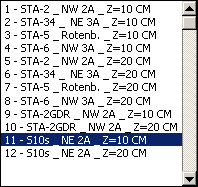
| Select
Case: |
|
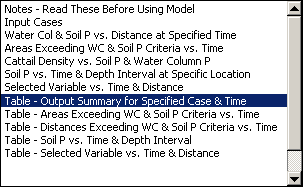
Select Output
Sheet: |
|
|
|
|
|
| |
|
| |
|
| |
|
| |
|
| |
|
| |
|
| |
|
| |
|
| |
|

|
|
|
|
|
| |
|
|
|
| |
|
|
|
| |
|
|
|
|
|

|
|
|
|
|
|
| |
|
Case: 11
S10s NE 2A Z=10 CM |
|
| |
|
|
|
|
|
| |
|
|
|
|
|
| Parameters: |
|
|
|
|
|
| Distance Displayed |
12 |
output displays results for this distance |
|
| Year Displayed |
30 |
output displays results for this time (years) |
|
| Maximum Years |
200 |
maximum number of
years simulated <= 200 years |
| Maximum Distance |
15 |
maximum distance plotted <= 15 km |
|
| |
|
|
|
|
|
| |
|
|
|
|
|
| Operation: |
|
|
|
|
|
| Navigate
via the menu screen or EPGM toolbar at top of screen |
|
|
| Select case from left box |
|
|
|
|
| Click
'Load Case' to start selected case or modify input values |
|
|
| Click 'Run Case'
to run simulation |
|
|
|
|
| Select output sheet from left box |
|
|
|
|
| Click 'View Sheet' |
|
|
|
|
|
| |
|
|
|
|
|
| To create a new case: |
|
|
|
|
| Copy new columns to right of existing
table on 'Inputs' sheet and edit |
|
|
| Assign new case number in increasing order |
|
|
|
| |
|
|
|
|
|
| Computations are
performed in spatial increments of 0.1 km and time increments of 1 year |
|
| Output is
displayed for time and depth intervals specified on the menu sheet |
|
| To
Return to Menu: Press Ctrl-m or Click 'EPGM Menu' Button on the Toobar |
|
| User Input Cells
are Red |
|
|
|
|
| |
|
|
|
|
|
| EPGM
Toolbar at the top of the screen can be used for navigation |
|
|
| Toolbar Functions |
|
|
|
|
|
| EPGM Menu |
moves to 'Menu' sheet |
|
|
|
| Edit Inputs |
moves to 'Inputs' sheet |
|
|
|
| Run |
loads currently selected case & runs model |
|
|
| Output Summary |
moves to 'Results' sheet |
|
|
|
| Upstream |
increases
output distance by 0.1 km (affects results on graphs_site sheet) |
| Downstream |
decreases output distance by 0.1 km (affects
results graphs_site sheet) |
| Restart |
restarts simulation (sets output time to 0
years) |
|
|
| Next Year |
moves output time forward by 1 year |
|
|
| Previous Year |
moves output time back by 1 year |
|
|
| Animate |
cycles through each year in sequence; press
'Esc' to stop |
|
| |
|
|
|
|
|
| If
the Toolbar remains after closing EPGM, right click on it and uncheck the
EPGM box. |
|
| |
|
|
|
|
|
| 9/4/2004 |
|
|
|
|
|
|
|
|
|
|
|